Optix Mpg27Cq Specs, Features, and Value: Is it worth the price tag?
Introduction
The MSI Optix MPG27CQ is a 27-inch curved gaming monitor that has drawn attention for its blend of high-resolution imagery, fast refresh rates, and gamer-oriented features. With 1440p resolution and a VA panel, the MPG27CQ aims to hit a middle ground: sharper detail than 1080p, deeper blacks than IPS, and smoother motion than many standard monitors. This review examines its specifications, real-world performance, strengths, and limitations to help buyers decide whether the price aligns with what they get.
What the Optix MPG27CQ advertises
As marketed, the Optix MPG27CQ offers the following headline features: a 27-inch curved VA panel at 2560 x 1440 (WQHD), a 144Hz native refresh rate, fast response marketing numbers (1ms MPRT), a 1500R curvature for increased immersion, and adaptive sync support (AMD FreeSync with variable refresh compatibility for many NVIDIA cards). The monitor is positioned toward gamers who want a balance between visual fidelity and competitive responsiveness.
Detailed product review and analysis
Design and ergonomics
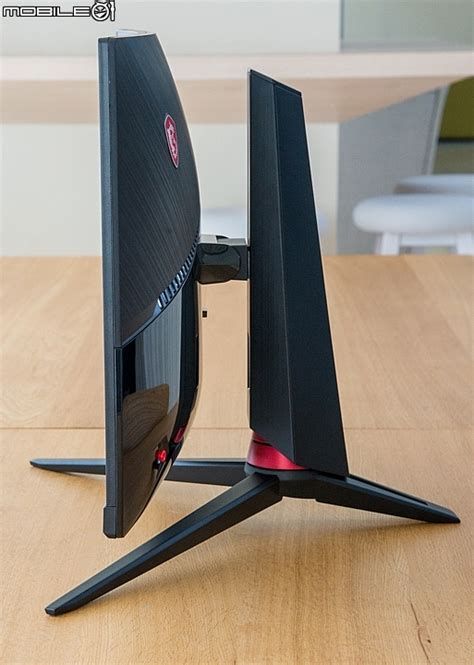
The MPG27CQ presents a gamer-centric aesthetic with a matte black finish and subtle accenting. The stand typically provides height adjustment and tilt, and the panel supports standard VESA 100 x 100 mounting for arms and brackets. On the back, there is often an RGB lighting element or ambient lighting feature geared toward desk setups — a common addition in the MPG (MSI Performance Gaming) lineup.
Panel and image quality
The monitor uses a VA (Vertical Alignment) panel, which brings the classic VA advantage: high static contrast and inky blacks. This is a meaningful advantage in darker game scenes and movies, where shadow detail looks richer compared with most IPS displays at similar price points. At 2560 x 1440 resolution on a 27-inch screen, PPI (pixels per inch) is in a sweet spot for sharpness without overwhelming GPU demands.
Brightness levels for this class of panel typically sit near 300 cd/m² (nits) and contrast ratios are in the several-thousand-to-one range (VA panels commonly advertise ~3000:1). That yields images with good depth, although HDR performance remains limited without strong peak brightness or local dimming; HDR support, if present, should be considered entry-level and mainly for marketing/compatibility rather than dramatic HDR improvement.
Motion handling and responsiveness
The MPG27CQ targets gamers by supporting a 144Hz refresh rate and a 1ms MPRT (Moving Picture Response Time) spec. In real-world testing on VA panels, motion clarity at 144Hz is noticeably smoother than 60Hz or 75Hz alternatives, and competitive gameplay benefits from lower input lag and faster frame pacing. Buyers should be aware that 1ms MPRT often refers to pixel persistence measurements rather than native gray-to-gray times; many VA panels report gray-to-gray in the 4–8ms range, which can show some trailing/ghosting in very fast pans. MSI often includes overdrive modes to reduce ghosting, but aggressive modes can introduce inverse ghosting, so some calibration is necessary to find the best balance.
Color and calibration
Out of the box, the MPG27CQ typically provides decent color for gaming and general multimedia. VA panels often have wider-than-sRGB coverage in some models, but color accuracy varies. For content creators or photographers who need precise color, an IPS panel with a factory calibration or a monitor targeted at creators may be preferable. For mixed use — gamers who also do streaming, video watching, and light photo editing — the MPG27CQ will be adequate, and a simple calibration with a colorimeter can improve results noticeably.
Connectivity and extras
Typical connectivity includes DisplayPort 1.2, two HDMI 2.0 ports, and a 3.5mm headphone jack. Some configurations add a small USB hub (USB 2.0) for peripherals. The platform supports adaptive refresh technologies (FreeSync and practical compatibility with NVIDIA cards through G-Sync Compatibility). The on-screen display (OSD) usually offers gaming-centric options like crosshair overlays, FPS counters, and predefined picture presets for different genres.
Build quality and long-term use
Build quality is serviceable: plastic construction with solid joints on the stand and an easy-to-use OSD joystick on the back of the monitor. Ventilation and heat are seldom issues for monitors of this size. Warranty and support are important to check regionally; MSI's standard warranty covers typical panel defects, but buyers should confirm the terms in their country. VA panels can be prone to slight uniformity or backlight bleed issues on some units, so buyers may encounter unit variation — a reality across many brands and price tiers.
Shop the latest Electronics picks on Amazon.
Shop Amazon →Real-world use cases: who benefits most?
- Competitive and casual gamers: Players who want 1440p sharpness and a 144Hz refresh rate without spending pro-tier prices will find the MPG27CQ appealing. The curved panel adds immersion in single-player and open-world titles.
- Couch/console cross-users: Console players who can output 1440p (or downscale/overscan-friendly setups) gain a cinematic feel from the curve; however, ensure the console supports 1440p at the desired refresh rate.
- Multimedia viewers: The VA panel's contrast is excellent for movies and streaming in dim rooms.
- Content creators (light work): Suitable for non-critical editing and general content tasks, but professionals demanding strict color accuracy should consider an IPS panel with factory calibration.
- Productivity users: The 27-inch 1440p space is productive for spreadsheets and multitasking, though the curve may be a personal preference.
Pros & Cons
- Pros
- Strong contrast and deep blacks from the VA panel for immersive visuals
- Sharp 2560 x 1440 resolution on 27 inches — good balance of clarity and performance
- 144Hz refresh rate delivers smooth motion and competitive edge in fast games
- Curved 1500R design increases immersion in single-player and cinematic titles
- Adaptive sync support reduces tearing with compatible GPUs
- Gamer-focused OSD features and presets
- Cons
- VA panel ghosting can appear in fast panning scenes; requires tuning of overdrive
- HDR capability is limited without high peak brightness or local dimming
- Color accuracy out of the box may not meet professional content-creation standards
- Unit-to-unit uniformity/backlight bleed can vary
- Some competitors offer IPS panels with faster gray-to-gray times and wider viewing angles at similar price points
Comparison table
The table below compares the MPG27CQ with three commonly considered 27-inch alternatives. Numbers are representative of typical configurations in this class.
| Model | Panel Type | Resolution | Refresh Rate | Curve | Adaptive Sync | Typical Brightness | Notable Strength |
|---|---|---|---|---|---|---|---|
| MSI Optix MPG27CQ | VA | 2560 x 1440 (WQHD) | 144Hz | 1500R | FreeSync / G-Sync Compatible | ~300 cd/m² | High contrast, immersive curve, gamer features |
| Dell S2721DGF | IPS | 2560 x 1440 | 165Hz | Flat | FreeSync / G-Sync Compatible | ~350 cd/m² | Better color/angles, higher refresh, strong calibration |
| ASUS TUF Gaming VG27AQ | IPS | 2560 x 1440 | 165Hz (OC) | Flat | G-Sync Compatible / FreeSync | ~350 cd/m² | High refresh with ELMB-sync options for motion clarity |
| Samsung Odyssey G5 | VA | 2560 x 1440 | 144Hz | 1000R–1500R (model dependent) | FreeSync | ~250–300 cd/m² | Aggressive curve and affordable price for immersive gaming |
Buying guide: what to consider before purchasing
1. Purpose and priorities
Identify the primary use cases. If competitive esports is the priority, the highest possible refresh rate and lowest input lag are paramount. If cinematic immersion and deep blacks are preferred, a curved VA monitor like the MPG27CQ can be appealing. For color-critical work, prioritize IPS panels with verified color gamut and factory calibration.
2. Panel type trade-offs
Each panel type has strengths: IPS for color and viewing angles, VA for contrast, and TN (rare now) for low latency. Buyers should weigh whether darker room contrast (VA) or color fidelity and viewing-angle consistency (IPS) serve their needs better.
3. Resolution and GPU capability
2560 x 1440 is a performance sweet spot for many GPUs: more demanding than 1080p but more achievable than 4K for high refresh rates. Ensure the buyer’s GPU can reliably push the desired frame rates at 1440p to take full advantage of 144Hz. Otherwise, the higher refresh rate will be underutilized.
4. Curve radius and desk setup
Curved monitors (1500R) are more immersive but can alter perceived geometry for straight lines in design work. Measure desk depth and sitting distance — curves are most effective when the viewer sits centered 2.5–4 feet away. For multi-monitor setups, matching curvature is important to avoid visual discontinuity.
5. Adaptive sync and compatibility
Confirm whether the monitor supports FreeSync and whether it has been validated as G-Sync Compatible if using an NVIDIA GPU. Adaptive sync reduces tearing and allows smoother gameplay at variable frame rates.
6. Ports and peripherals
Check for DisplayPort (required for the highest refresh rates on PC), and multiple HDMI ports for console connectivity. A built-in USB hub and headphone jack are convenient additions, but verify hub versions (USB 2.0 vs 3.0) if data transfer is needed.
7. Ergonomics and mounting
Height adjustment, tilt, swivel, and VESA mount compatibility matter for comfort and flexible positioning. If the monitor’s stand lacks features, ensure VESA compatibility to use a third‑party arm.
Discover deals on Electronics — updated daily.
See Deals →8. Warranty and return policy
Because of potential unit variability (uniformity, dead pixels), a retailer return window and manufacturer warranty are important. Check local service options and typical RMA turnaround times.
9. Price comparison and alternatives
Compare street price against similarly specified IPS and VA models. If the MPG27CQ is significantly cheaper than calibrated IPS alternatives, it may represent good value for gamers. If similarly priced to higher refresh IPS monitors, consider whether contrast or color fidelity is the higher priority.
Is the Optix MPG27CQ worth the price tag?
Whether the Optix MPG27CQ is worth the price depends largely on buyer priorities and the actual retail price at purchase time. For those who value immersive single-player experiences and deep blacks — and who want 1440p clarity without paying top-tier premiums — the MPG27CQ packs useful strengths: high contrast, satisfying resolution, and a 144Hz panel that improves motion smoothness.
For competitive players who demand the absolute lowest persistence and fastest pixel response in every scenario, some IPS or faster-VA alternatives with higher refresh ceilings (165Hz+) or specialized motion-enhancement features might be preferable. Content creators who require color-critical workflows will likely prefer an IPS display with higher factory color accuracy.
In short, the MPG27CQ offers strong value when the following conditions apply:
- The buyer prefers deeper contrast and darker-room performance.
- The buyer wants a curved, immersive experience on a 27-inch 1440p panel.
- The price is competitive relative to IPS alternatives, or the buyer prioritizes contrast over absolute color accuracy.
Practical tips for buyers
- Test for ghosting and backlight uniformity in the retailer’s demo if possible; VA ghosting varies by unit and tuning.
- Use a DisplayPort connection to ensure native 144Hz at 1440p on PC — some HDMI ports may be limited to lower refresh rates.
- Calibrate with a colorimeter if planning to do significant photo or video work; a simple profile can meaningfully improve color fidelity.
- Adjust overdrive and blur-reduction settings to find the best balance between inverse ghosting and trailing in fast games.
- Check the return window and warranty coverage in case of dead pixels or severe uniformity issues.
Conclusion
The MSI Optix MPG27CQ is a well-rounded 27-inch curved gaming monitor that prioritizes contrast and immersion while delivering 1440p resolution and 144Hz refresh performance. It suits gamers who favor deeper blacks and cinematic presentation, and it provides competitive-level smoothness for most playstyles. However, buyers must accept the typical VA trade-offs — possible ghosting in very fast motion and less-than-IPS color consistency — and evaluate whether those characteristics match their use case.
Ultimately, the MPG27CQ is worth the price for users who prioritize immersion and contrast and who find the monitor’s street price favorable relative to IPS rivals. Those who place top priority on color-critical work or the absolute lowest pixel response should compare carefully with IPS alternatives before deciding.