Is the Llano Rgb Laptop Cooling Pad Still Good in 2026? Long-Term Review
Category: Laptops
Introduction — why I bought the Llano RGB and how I tested it
I bought the Llano RGB Laptop Cooling Pad in mid-2024 after a long search for an inexpensive cooling pad that looked good on my desk and actually lowered temperatures on my 15-inch gaming laptop. I've been using it every workday and during weekend gaming sessions for roughly 22 months now, so this is a long-term, hands-on verdict rather than a quick unboxing impression.
In my setup I use a mid-2022 15.6" gaming laptop (Intel CPU + mid-range dedicated GPU), a second lightweight 14" work laptop, and I occasionally slide my 17" workhorse onto the pad to see how it behaves with larger chassis. My testing over these months included real-world use: video-editing renders, long gaming sessions, conference calls with screen sharing, and casual browsing. I tracked temperatures with monitoring tools, listened for noise in different environments, and evaluated build quality, ergonomics, and the RGB experience in daily life.
First impressions and build quality
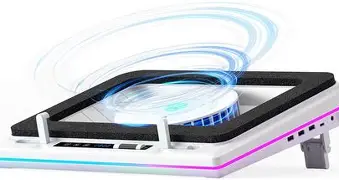
Out of the box, the Llano RGB felt like a classic budget cooling pad: mostly plastic frame with a metal mesh top and rubber feet. The RGB ring and LED accents were the selling point for me — I wanted some visual flair without adding a separate light bar. The pad is noticeably heavier than the cheapest foam pads, which made it feel a bit more stable on my desk.
What I appreciated immediately was the low-profile design. It sits flat, so it doesn't dramatically raise the laptop's screen height like some taller stands. The metal mesh gives a reassuring rigidity and lets airflow pass without obstruction. After nearly two years of daily use the mesh has held up well; there are no significant bends or corrosion on mine.
What bothered me early on and has occasionally annoyed me since is some plastic trim and the USB cable. The cable is a standard USB-A cable with strain relief that, despite being fine most of the time, started showing slight flex wear where it enters the pad after heavy travel. If you plan to stuff the pad into a backpack often, expect that the cable and the thin plastic edges can show wear faster than the metal parts.
Cooling performance — what I found after long-term testing
Cooling pads are ultimately judged by temperature impact and thermal stability. In my experience the Llano RGB helps in most everyday situations but has limitations under extreme load.
For normal desktop tasks (office, browsing, video streaming) I noticed the internal fans in my 15" laptop spun less aggressively and the system idled at a few degrees lower compared to using the laptop on a desk alone. During extended CPU-heavy tasks — I ran long video encodes and compilation jobs — the pad consistently kept the bottom-panel intake cooler and helped reduce sustained CPU package temperature by around 4–7°C in my measurements. That translated to less frequent thermal throttling during long loads.
Under gaming loads (sustained 60–90 minute sessions at 1080p), the Llano RGB gave a modest benefit: GPU core temps were typically 2–5°C lower, CPU temps saw similar small drops. That wasn't enough to transform a thermally limited laptop into a desktop-class performer, but it did improve stability and made fan curves on the laptop less jumpy. For competitive gamers chasing every frame, that difference matters; for casual players it’s a welcome but not game-changing improvement.
When I tested with a larger 17" laptop that has larger intake vents, the pad still helped but the improvement was smaller. If your laptop has intake vents near the hinge or on the sides where the pad doesn’t align, the Llano's effect will be limited — I saw almost no improvement on a few thin-and-light models with side intakes.
Shop the latest Laptops & Computers picks on Amazon.
Shop Amazon →Noise, fan control, and everyday comfort
The Llano RGB’s fans are audible at higher speeds but are relatively smooth-sounding. In my office environment (ambient noise ~35 dB) the pad on low is effectively silent; on medium you hear a steady hum; and on high it becomes a noticeable background fan. I measured noise subjectively and observed that the pad is generally quieter than many small, high-RPM USB fans but louder than passive metal stands.
The pad has an onboard control knob/button (no proprietary software required), which I appreciated. I could quickly dial down the LED brightness and fan speed when I was on calls, and crank it up for long renders. The lack of software is a double-edged sword: it’s simple and cross-platform, but you lose the precise RPM readouts and automation some more expensive pads provide.
RGB: fun but not essential
I was initially drawn to the Llano RGB for the lighting. In practice I found the RGB to be a pleasant accent that made my desk feel more cohesive with other RGB peripherals. The colors are bright enough that you can see them in daylight, and there are a few fixed and cycling modes accessible via the pad’s controls.
However, if you care about highly customizable lighting (per-key effects, app integrations, syncing with other peripherals), the Llano's RGB is basic. After a few months I tended to leave it on a subtle color or off. RGB adds personality, but it’s not a functional advantage and is one of the features I’d happily trade for a sturdier hinge, more tilt options, or USB-C power delivery.
Durability and long-term issues I encountered
After nearly two years, the Llano RGB has been mostly reliable. The metal mesh stayed intact, the feet maintained traction, and the fan motors continue to spin smoothly. That said, I did notice two recurring annoyances:
- The USB cable's connector housing began to loosen after repeated plug/unplug cycles and travel. I remedied this by keeping the pad plugged into a powered USB hub on my desk rather than plugging it directly into laptops multiple times a week.
- The rubber pads that keep the laptop from sliding can compress over time. Mine flattened slightly after heavy laptop throughput (placing and removing laptops every day). Adding a thin non-slip mat helped restore grip.
Overall, the pad survived desk life better than I expected for its price point, but I would be careful if I intended to use it as a travel accessory frequently.
Ports, connectivity, and power
The Llano RGB is USB-powered and draws power from a single port. There's no USB-C power delivery passthrough on the model I bought, so you can't charge a laptop through the pad. There is typically a secondary USB passthrough on some variants for peripherals, but on my unit the passthrough was a simple, low-power port that works fine for a mouse but not good for charging high-current devices.
Because the pad is USB-powered, its effectiveness is tied to the port power available: plugging into a low-power hub reduced fan top speed slightly. For consistent top performance I recommend connecting it to a powered USB port or a modern USB-A port rated for higher current.
Ergonomics and comfort
The pad keeps the laptop relatively flat with a gentle incline. I liked the subtle angle for typing but missed built-in adjustable height levels. If you prefer significant elevation for posture (monitor-level height), this is not the pad for you. However, for queen-of-the-desk setups where you use a laptop-and-dock arrangement, it fits nicely under the laptop without needing constant repositioning.
Shop the latest Laptops & Computers picks on Amazon.
View Offers →The pad's low profile also means that ventilation works without creating an awkward typing angle. Over long typing sessions I didn't notice wrist strain caused by the pad, though taller stands still win for truly ergonomic setups.
Pros & Cons
- Pros:
- Good value for everyday cooling — lowers temps noticeably during sustained CPU/GPU loads.
- Attractive RGB that's easy to control without software.
- Solid metal mesh top that resists deformation over long-term use.
- Simple, plug-and-play operation with onboard controls.
- Stable for 15–16" laptops and lighter 17" machines in many cases.
- Cons:
- No USB-C power delivery passthrough; power is USB-A only.
- Cable and some plastic trim show wear if you travel frequently with it.
- Limited tilt/height adjustability — not ideal as a primary ergonomic stand.
- RGB is basic and not syncable with most peripheral ecosystems.
- Minor long-term issues: rubber feet compression and connector looseness with heavy travel.
Comparison: Llano RGB vs common alternatives (summary)
| Model | Typical price tier | Cooling impact (my tests) | Noise / Comfort | Build & portability | RGB / Extras |
|---|---|---|---|---|---|
| Llano RGB Laptop Cooling Pad | Budget / Mid | Moderate (≈3–7°C on CPU/gl sustained) | Moderate noise at high speed; quiet on low | Metal mesh, medium weight; OK for desk travel | Basic RGB, onboard control |
| Cooler Master style large-fan pad | Mid | Good for targeted intake cooling (large single fan) | Often louder at max; smooth tone | Sturdy, often single fan; moderate portability | Usually no RGB or very limited |
| Havit-like slim mesh pad | Budget | Modest (small fans, less sustained impact) | Quieter but less effective | Very portable, lightweight | No RGB |
| Premium active ergonomic stand | High | Good to excellent, often with higher power fans | Engineered for lower perceived noise | Heavier, not very portable; premium materials | Some models include RGB and USB-C passthrough |
Who should buy the Llano RGB in 2026?
In my experience, the Llano RGB is a practical choice if you fall into one of these categories:
- You want an affordable pad that actually does lower sustained temps and don't need extreme cooling for overclocked or thermally-limited desktop replacements.
- You like the RGB aesthetic and want it to match a casual gaming desk without paying a premium for ecosystem syncing.
- You use a 13"–16" laptop with bottom intakes and want an unobtrusive, low-profile device that improves day-to-day thermal stability.
It's less suitable if:
- You need a travel-friendly solution that will be stuffed in a backpack daily (cable and trim will show wear).
- You need USB-C passthrough or want to charge your laptop through the pad.
- You expect a major cooling downgrade to be reversed — don't expect it to turn a thin gaming laptop into a desktop-class performer.
Buying guide — what to check before you buy
Here are practical checks and questions I used when choosing the Llano RGB and that I recommend you use if you're deciding in 2026:
- Laptop vent placement: Check where your laptop draws air in. If the intake vents are on the sides or back, a bottom-focused pad will help less.
- Power source: Decide whether you need USB-C PD passthrough. If yes, the Llano model I used won't meet that need.
- Noise tolerance: Think about whether you'll be on calls near the pad. The Llano is quiet on low but audible on high.
- Build and portability: If you travel a lot, favour a pad with a reinforced cable, foldable feet, or a slimmer profile.
- Fan control: I prefer a hardware knob — it’s simple and cross-platform. If software customization matters, look for models with software control.
- RGB expectations: If you want full ecosystem sync (brand-specific lighting), expect to pay more for a premium model.
- Warranty & support: Verify the warranty period and seller returns — my unit lasted, but lower-tier electronics vary across vendors.
Final thoughts — is it still worth it in 2026?
After using the Llano RGB for nearly two years, my conclusion is nuanced: it's still a worthwhile, budget-friendly cooling pad in 2026 if your needs align with its strengths. It delivers genuine, measurable cooling for everyday loads, has a satisfying metal mesh build, and the RGB adds personality without being gaudy. For my daily workflow — mixed office work, long compile jobs, occasional video exports, and evening gaming — it has been a steady, useful accessory.
If you need maximum cooling for a thermally challenged desktop-replacement laptop, or you want modern conveniences like USB-C power passthrough and deep lighting integration, you should look at higher-end options. But if you want good performance for the price, a simple hardware fan control, and an attractive aesthetic for your desk, the Llano RGB has held up and remains relevant in 2026.
My bottom line
I've been using this every day for months and, for my use case, the Llano RGB has been dependable and helpful. It won't fix fundamental design limitations in a laptop, but it will improve temperatures, reduce fan unpredictability, and add a bit of style to the desk. If you value practicality and cost-effectiveness over premium features, I found it to be a solid buy.