Even Realities G2 Smart Glasses Specs, Features, and Value: Is it worth the price tag?
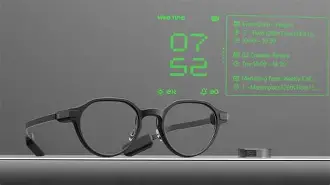
The Even Realities G2 positions itself as a privacy-first, productivity-focused pair of smart glasses aimed at professionals, frequent travelers, and people who want contextual information without broadcasting their life. Rather than chasing full mixed-reality immersion with cameras and loud speakers, the G2 emphasizes a high-contrast micro‑LED in-lens display, long battery life, and context-aware AI features surfaced discreetly in the wearer’s field of view. This article reviews the G2 in detail, explains real-world use cases and buyer priorities, and helps readers decide whether the device justifies a premium spend.
Introduction: what the G2 is trying to solve
Smart glasses have split into two camps: immersive AR devices that overlay rich 3D content and camera-forward social wearables that add audio and video capture. Even Realities took a different route with the G2: keep the hardware light and unobtrusive, skip cameras for privacy, and deliver tightly integrated text and context via a bright micro‑LED waveguide that’s readable in daylight. The company pairs that hardware with an on-device and cloud-assisted AI that summarizes conversations, offers live translations, and provides teleprompter-style assistance. The goal is practical, everyday productivity rather than entertainment or 3D gaming.
Key specs and hardware overview
At a high level, the G2 balances optical performance, durability, and discreet interaction. The specs below summarize the hardware and core capabilities that matter to buyers.
- Display: Dual-layer floating micro‑LED monochrome display (green); approximately 640 × 350 pixels and a field of view that prioritizes legibility over immersion. The display is bright—rated up to roughly 1,200 nits—so text remains visible outdoors.
- Optics: Even’s waveguide optics (HAO 2.0) aim to maximize transparency when the display is off; the lenses look close to ordinary glasses to outside observers.
- Weight & build: Extremely lightweight frames built from aerospace-grade alloys; frames typically sit in the mid‑30 gram range, contributing to all‑day wearability.
- Durability: IP67 dust and water resistance for everyday commutes, light rain, and dust exposure.
- Privacy-first design: No onboard camera and no built-in loud speakers—audio and visual cues are routed via paired devices or optional tactile controllers.
- Input methods: Subtle touch sensors on the temples and voice activation (“Hey Even”). An optional R1 smart ring is available for gesture control and additional wellness sensing.
- Sensors & microphones: Multiple microphones for voice input and ambient-light sensing for auto-brightness; geomagnetic sensors assist with navigation overlays.
- Prescription support: Works with a wide range of diopter corrections to accommodate prescription wearers.
- Battery & charging: Strong endurance for a wearable—up to multiple days of typical use on a single charge with a compact charging case that extends usable time by providing several full charges.
- AI features: Contextual generative assistant features (Conversate AI), live captioning and translation, in‑view teleprompter, and meeting summaries accessible in-lens.
Detailed analysis — what stands out
Display technology and legibility
The micro‑LED approach is the G2’s headline differentiator. Micro‑LEDs provide high contrast and strong daylight legibility compared with many OLED-based companion displays. For the core use cases—reading short messages, getting navigation cues, live captions, and seeing translations—the G2’s monochrome green display places emphasis on clarity and battery efficiency rather than photorealistic color overlays. For professionals who need easily legible text in sunlight (outdoor navigation, live subtitles during presentations, or quick glanceable notifications in meetings), that trade-off is sensible.
Privacy and social acceptability
Because the G2 omits a camera and loud speakers, it reduces common privacy concerns that have slowed smart-glasses adoption in workplaces and public spaces. The result is a device more likely to be acceptable in meetings, classrooms, and secure environments where recording is disallowed. The near-invisible appearance of the lenses with the display off also helps avoid the “tech on the face” stigma that can make social interactions awkward.
AI features and real-world usefulness
Even’s AI is optimized for conversational assistance: it can listen (with consent), summarize exchanges, surface contextual prompts about people and topics, and provide on-the-fly translations. Real-world examples include:
- Live translations for travel—displaying translated subtitles during conversations with speakers of other languages, without forcing either party to hold a phone.
- Meeting assistance—displaying agenda bullets, short reminders, or follow-up questions while the wearer participates in a discussion.
- Teleprompting for speakers—scrolling notes or key points within the wearer’s view during presentations.
- Accessibility—providing live captions for people who are hard of hearing in noisy environments where audio-only solutions struggle.
These features make the G2 particularly compelling for people who rely on information flow rather than immersive visuals—consultants, salespeople, interpreters, and presenters.
Controls, accessories, and ecosystem
The G2 supports subtle temple touch controls and “Hey Even” voice commands. For users who prefer tactile feedback or want to avoid voice activation in meetings, the R1 smart ring provides gesture control and wellness tracking. The broader ecosystem is still maturing: third‑party apps and integrations are limited compared with phone platforms, so buyers should evaluate whether the current app set meets their workflow needs or whether they can tolerate a more closed ecosystem until more integrations appear.
Discover deals on Laptops & Computers — updated daily.
Shop Amazon →Limitations and trade-offs
No camera and no speakers are core to the G2’s design—and they are also constraints. Without a camera, environment-aware AR (placement of virtual objects tied to the world) is not possible. The single-color micro‑LED limits multimedia and gaming use cases that rely on full-color overlays. The field of view is intentionally modest so the display remains subtle and readable, but that means the G2 is not a substitute for headset-style AR productivity or entertainment. Finally, some advanced features rely on cloud connectivity and companion apps, which introduces dependency on a smartphone and periodic firmware updates.
Pros & Cons
- Pros
- Excellent daylight legibility thanks to micro‑LED brightness and contrast
- Privacy-friendly design—no camera, discreet appearance
- Long battery life and a portable charging case for extended use
- Practical AI features focused on conversational assistance and translation
- Prescription support and lightweight frames for all‑day wear
- IP67-rated durability for everyday use
- Cons
- Monochrome display limits multimedia richness compared with full-color AR devices
- No camera means no world-anchored AR or spatial mapping
- Limited third‑party app ecosystem at launch compared to phone platforms
- Optional R1 ring adds to total cost for those who want tactile control
- Higher price tier with value tied to how much the user adopts the AI and notification workflows
Comparison table: Even G2 vs. typical alternatives
| Feature | Even Realities G2 | Even G1 (predecessor) | Typical Color AR Glasses (representative) |
|---|---|---|---|
| Display tech | Micro‑LED (monochrome green), high brightness for outdoor legibility | Smaller, lower-brightness display; more limited text area | RGB OLED / LCoS — full color, richer AR visuals but lower outdoor brightness |
| Camera | No (privacy-first) | Generally no or limited (depending on model) | Usually yes — used for mapping and spatial AR |
| Audio | No loudspeakers; rely on paired audio or bone-conduction accessories | Similar approach | Often includes integrated speakers or bone conduction |
| Primary use case | Productivity, translation, live captions, meeting assistance | Basic notifications and heads-up info | Immersive AR content, spatial apps, gaming, industrial overlays |
| Social acceptability | High—discreet, no camera | High | Lower—visible cameras and obvious AR elements |
| Ecosystem maturity | Growing; focused on Even services and limited third-party apps | Smaller | Varies—some platforms have strong developer ecosystems |
Real-world use cases and who should consider the G2
The G2 is best suited to people and workflows that prioritize discrete, glanceable information and privacy over immersive visuals. Typical buyers include:
- Business professionals: Sales reps, account managers, and consultants who need agendas, quick notes, or remote coaching while in meetings without taking out a phone.
- Interpreters and travelers: Live translation and subtitles can remove friction when communicating across languages.
- Presenters and public speakers: Teleprompter functionality and on-the-fly cues help maintain eye contact while staying on message.
- Accessibility use: People with hearing difficulty who benefit from live captions in noisy or public spaces.
- Privacy-conscious adopters: Anyone who wants smart wearable benefits but avoids camera-enabled devices for social or regulatory reasons.
Buying guide: what to check before committing
Smart glasses are both a hardware and an ecosystem purchase. The questions below are practical touchpoints a buyer should examine before making a decision.
1. Try them for fit and comfort
Lightweight frames matter because smart glasses are a wear-all-day device by design. Confirm fit with your preferred frame shape and check whether they accommodate your prescription—Even supports a wide diopter range but always verify with real-world try-on or retailer policies.
2. Test display legibility in your environments
Visit a store or demo to see how the micro‑LED looks outdoors, under office lighting, and in dim meeting rooms. Buyers who spend significant time outdoors should prioritize brightness and anti-glare performance.
3. Understand the workflow integration
Which apps and integrations are available today? If a buyer relies on a particular calendar, conferencing tool, or productivity app, confirm whether the G2 surfaces meaningful content from those services or whether manual workflows are required.
4. Battery expectations and charging habits
Even advertises multi‑day battery life for typical use and extended life via a charging case. Clarify what “typical use” means: heavy continuous captioning and AI processing will drain batteries faster than periodic glanceable notifications. Confirm the included charging accessories and whether wireless or fast-charge options exist.
Find top-rated Laptops & Computers products at great prices.
View Offers →5. Control preferences
Decide whether touch and voice controls are acceptable in your context or whether the optional R1 ring (tactile control) is necessary. The ring adds cost but may be worth it for confidentiality during meetings or for users who prefer non‑verbal interactions.
6. Data handling and privacy
Even emphasizes on-device privacy and no persistent camera capture, but buyers should read the privacy policy to understand what conversation data is processed, whether AI features use cloud servers, and how long transcripts are retained. For workplace use, check company policies about wearable devices and any IT requirements for approved hardware.
7. Cost vs. expected value
Assess whether the G2 replaces existing workflows (e.g., phone-based translation or podium notes) or supplements them. For many professionals, time saved by having information hands-free and glanceable during meetings or travel can justify a premium price. For casual users who want colorful AR or media playback, the G2’s monochrome, privacy-driven approach may feel limiting.
Alternatives to consider
When comparing the G2 to other products, frame decisions around use cases:
- If immersive full-color AR and environment mapping are required, look at devices with RGB waveguides and cameras from other vendors.
- If audio-centric use is paramount (music, calls without external earbuds), devices with integrated speakers or bone-conduction audio would be preferable.
- If cost or fashion is the primary concern, entry-level displays and smart frames may offer notifications at lower price points but with poorer outdoor legibility and shorter battery life.
Practical tips for first-time buyers
- Start with a clear primary use case—translation, meetings, or accessibility—and prioritize that when evaluating demos.
- Confirm return policies and warranty terms. Prescription lenses, fit issues, and software updates can affect long-term satisfaction.
- Factor in accessory costs, such as a controller ring, specialized charging case, or prescription lens conversion.
- Watch for enterprise programs. Some companies offer bulk purchase, management, and privacy guarantees for workplace rollout.
Conclusion: is the Even Realities G2 worth the price tag?
The Even Realities G2 is a considered, niche product: it is not trying to be a consumer-grade entertainment headset or a general-purpose camera-equipped AR device. Instead, it targets a specific set of needs—privacy-sensitive, productivity-oriented, and outdoor-legible heads-up information. For professionals who will use live captions, in‑view teleprompters, or on-the-fly translations as part of their daily workflow, the G2’s combination of readable micro‑LED optics, long battery life, and contextual AI assistance can deliver measurable value and justify a premium investment.
However, buyers who want full-color immersive AR, spatial computing anchored to the environment, or integrated audio for media will find those capabilities intentionally absent. The decision ultimately hinges on how much the buyer values discreet, glanceable information and privacy over visual richness. If those priorities align, the G2 represents a compelling, purpose-built option among high-end smart glasses; if not, there are other devices better suited for color AR or media consumption.