5 Hidden Features of the Kobo Clara Colour You Must Know About
Introduction
The Kobo Clara Colour is often discussed for its compact size and the fact that it brings color to a 6-inch E Ink screen, but beneath the headline features are several less obvious capabilities that can change how people read, organize, and consume content. This article digs into five hidden features that matter for real-world use — from library borrowing workflows to typographic control and article-saving conveniences. Whether the reader is a commuter who reads news on the go, a parent sharing illustrated picture books, or a comics fan who wants better screen handling, these practical details can influence a buying decision and day-to-day satisfaction.
What the Kobo Clara Colour Is (Briefly)
At its core, the Kobo Clara Colour is a compact e-reader designed for comfortable one-handed reading. What sets it apart from many other small e-readers is its use of color-capable E Ink technology, which opens up new use cases beyond plain text novels — think comics, cookbooks with photos, and children’s picture books. But the headline “color screen” is only the beginning; Kobo’s software and ecosystem layer on features that many users notice only after spending time with the device.
Five Hidden Features That Make a Practical Difference
1. Color Rendering Modes and Image Handling — Not Just Pretty Pictures
Many buyers assume color E Ink is just about seeing photos in color. In practice, Kobo’s software gives subtle control over how color is handled: the device can downsample, mute, or prioritize color saturation to balance readability and battery life. That matters in real life when switching between text-heavy ebooks and image-rich content.
Real-world use cases:
- Reading illustrated children's books: Parents can toggle settings so illustrations retain enough color to engage a child while keeping text crisp and easy to read.
- Comics and graphic novels: Color rendering modes can reduce color banding or tweak contrast so speech balloons and panels remain legible without washing out fine line art.
- Cookbooks and reference guides: Photographs benefit from a livelier palette when the user wants to examine color differences (e.g., doneness of food, color-coded diagrams).
Why buyers care: Color-capable E Ink can be either gimmicky or genuinely useful depending on how well the device lets users control rendering. The Clara Colour’s practical settings make it useful for mixed-content libraries.
2. Advanced File and Layout Controls — Real Flexibility for Different Formats
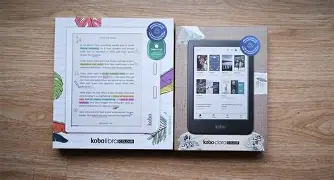
One of the strengths that often surprises new Kobo owners is how much control the device offers over layout and formats. Beyond standard ePub, the Clara Colour handles fixed-layout books, comic archives (CBZ/CBR), and PDF reflow options better than many compact e-readers. Built-in cropping, margin adjustments, and multi-touch zoom let the reader tailor the page to the screen rather than fighting against it.
Real-world use cases:
- Reading PDFs: Instead of squinting at tiny text, the reader can crop margins and zoom in on columns or diagrams for a far better experience than many generic PDF readers provide on small screens.
- Comics: Panel-by-panel reading modes and pinch-zoom cropping mean users can follow sequential art without losing details or missing dialogue.
- Sideloaded content: Hobbyists who download free public-domain works or purchase books in various formats can import and read without converting everything to a single format.
Why buyers care: Many people build libraries from varied sources — public-domain sites, direct downloads, or format-converting tools. The Clara Colour reduces friction by recognizing and intelligently displaying those files.
3. Built-In Library Borrowing and Offline Library Management
Kobo devices are often chosen by people who use public libraries because the Kobo ecosystem includes straightforward borrowing workflows. The Clara Colour’s library integrations let users find, borrow, and return ebooks from participating libraries from the device interface (or via the Kobo app), removing the need for third-party software in many cases.
Real-world use cases:
Discover deals on Laptops & Computers — updated daily.
See Deals →- Frequent borrowers: Commuters who borrow bestselling novels can check out titles on a schedule and return them without touching a laptop.
- Travelers: Before a trip, a reader can borrow several books and have them ready offline for flights — helpful where cellular or Wi-Fi access is intermittent.
- Shared household use: Family members can manage loans from different library accounts and keep reading lists organized.
Why buyers care: Library integration directly affects cost of ownership and convenience. For readers who rely on public libraries, having a device that makes borrowing painless is a major plus.
4. Pocket Integration and Article Reflow — Turn Web Clutter into Comfortable Reading
A less-publicized but genuinely useful feature is Pocket integration. When users save long-form articles from a phone or desktop to their Pocket account, the Clara Colour can download and present those articles in a reflowed, distraction-free format optimized for the E Ink screen. Articles lose ads, sidebars, and inconsistent fonts, becoming easy-to-read items that can be consumed like short ebooks.
Real-world use cases:
- Daily reading routine: Someone with a few saved articles each morning can queue up reading for commutes, removing the need to strain at a phone screen during a crowded ride.
- Research and study: Students saving reference pieces can highlight, annotate, and keep a running set of notes in one place for later review.
- Offline reading: Articles saved ahead of time remain available without an internet connection, which is handy on planes or rural trips.
Why buyers care: Many people split their reading between news sites and ebooks. Pocket integration turns the Clara Colour into a consolidated reading device that handles both long-form articles and traditional ebooks well.
5. Deep Typographic and Annotation Controls — Tailor the Reading Experience
Kobo devices have long emphasized typographic control, and that tradition continues with the Clara Colour. Beyond basic font size and line spacing, users can import custom fonts, take advantage of advanced hyphenation and justification settings, and use the so-called “type tuning” or font preview tools to choose how text renders. Combined with robust annotation and highlighting tools — and the ability to export notes — this makes the device powerful for study, reference, and long-term reading projects.
Real-world use cases:
- Serious readers and students: Custom fonts and fine-grained layout control reduce eye fatigue and make dense texts more approachable.
- Research workflows: Highlights and notes can be exported or synced, enabling a workflow from reading to writing without retyping annotations.
- Accessibility adjustments: Users with mild visual impairments can tune fonts, margins, and spacing to improve legibility without large hardware changes.
Why buyers care: The ability to personalize typography changes how long a device can remain comfortable to use. For readers who spend hours a day with text, these hidden controls significantly affect satisfaction.
Detailed Product Analysis
When assessing the Clara Colour for actual purchase, it helps to look beyond the headline and think about how the device will live in a buyer’s daily routine. The combination of color-capable E Ink and Kobo’s mature software yields a device that is versatile rather than specialized. For a reader who primarily consumes plain novels, the color capability is a nice bonus but not a necessity. For someone who mixes novels with illustrated works, comics, or web articles, the Clara Colour addresses pain points such as poor PDF handling and the inability to comfortably read photo-heavy books on monochrome screens.
Software is where the Clara Colour shines. Kobo’s settings let users fine-tune appearance and behavior: whether to prioritize color accuracy, battery conservation, or refresh speed; how to reflow PDFs; and how to handle sideloaded comic archives. The built-in reading ecosystem, including a library borrowing pathway and Pocket integration, means many workflows that previously required a laptop can now be handled entirely on-device. Battery life still benefits from E Ink’s efficiency, and in everyday mixed use a user can expect multiple days of reading between charges depending on color usage and Wi‑Fi activity.
Discover deals on Laptops & Computers — updated daily.
See Deals →Pros & Cons
- Pros:
- Color-capable E Ink expands usable content beyond plain-text novels.
- Strong format support (reflow PDFs, comics formats, ePub) reduces conversion headaches.
- Integrated library borrowing makes public library access straightforward.
- Pocket integration turns saved web articles into comfortable offline reads.
- Advanced typography and annotation controls support extended reading and research workflows.
- Cons:
- Color E Ink still lags LCD/OLED for vibrancy; highly color-dependent material may not match expectations from tablets or phones.
- Small screen size limits the usefulness of some fixed-layout or heavily detailed PDFs.
- Some advanced features require digging through menus; casual users may not discover them without guidance.
- Ecosystem lock-in risks: heavy investment in any single store or library system can make switching devices more work.
Comparison Table — How the Clara Colour Stacks Up Practically
| Feature | Kobo Clara Colour | Kobo Clara HD (Monochrome) | Typical Small Color Tablet |
|---|---|---|---|
| Screen Type | Color-capable E Ink for mixed content | Monochrome E Ink focused on text | LCD/OLED — vibrant but power-hungry |
| Best For | Comics, illustrated books, long-form articles | Long text novels and battery longevity | Full-color magazines, video, web browsing |
| File Format Flexibility | High — ePub, CBZ/CBR, PDF tools | High — similar ePub/PDF tools | Very high — any app-based format |
| Library Borrowing | Built-in support | Built-in support | Possible via apps, but varies |
| Article Saving (Pocket) | Integrated | Often available | Via browser or apps |
| Annotation & Typographic Control | Extensive | Extensive | Depends on apps |
Buying Guide — What to Consider Before Purchasing
When deciding whether the Kobo Clara Colour is the right device, consider the following checklist based on typical buyer concerns and real-world usage patterns.
1. What will you read most?
If the library is mostly text novels, a monochrome e-reader might suffice and provide slightly better contrast and battery life. If the library includes comics, illustrated books, or many cookbooks, the color capability becomes more valuable.
2. Do you borrow from public libraries?
Built-in borrowing support is a major convenience. Verify that your local library’s ebook service is compatible with Kobo’s lending platform and think about how often you borrow. For heavy borrowers, seamless lending is a practical time-saver.
3. How important is file flexibility?
Buyers who like to sideload content — own-document PDFs, comics from varied sources, or niche ebooks — should prioritize a device with strong format support and layout tools. The Clara Colour performs well here compared to many proprietary ecosystems.
4. Are advanced typographic controls important to you?
Readers with specific accessibility needs, or those who prefer particular fonts and spacing for long reading sessions, will value the Clara Colour’s typography options and font import capability.
5. Battery life and portability
Consider daily reading habits: frequent short sessions (commuting) vs. long weekend marathons. Color E Ink judiciously used still gives long battery life compared to LCD tablets, but heavy use of color, Wi‑Fi, and frequent page refreshes will reduce run time.
6. Ecosystem and long-term use
Think about whether the user wants a tightly integrated ecosystem (store purchases tied to one vendor) or the flexibility to sideload. Kobo leans toward openness and supports common formats, which suits buyers who want to keep libraries portable.
Practical Tips to Unlock These Features
- Explore the display settings early: experiment with color rendering and refresh strategies to find the best balance of image fidelity and battery life.
- Use Pocket and save a handful of articles to see how the device handles long-form web content before committing to a reading routine.
- Try borrowing a library book to test the borrowing and return workflow; this often uncovers account or DRM steps the first time.
- Sideload a comic archive (CBZ) and a PDF to learn cropping, panel-by-panel reading, and reflow behaviors — this familiarizes the user with practical shortcuts.
- Import one custom font if typography matters; the improvement in comfort can be immediate for some readers.
Conclusion
The Kobo Clara Colour stands out not simply because it can display color, but because of how Kobo’s software and ecosystem turn that capability into practical utility. The hidden features — from nuanced color rendering and robust format handling to Pocket integration and deep typographic control — show the device is designed for diverse reading habits rather than a single niche. Buyers who mix novels with illustrated works, borrow frequently from libraries, or rely on offline article reading will find the Clara Colour especially compelling. Casual readers who want a no-fuss reading device should still weigh whether the color features justify the premium over a monochrome model. In short, the Clara Colour offers a flexible, feature-rich reading experience that rewards users who take time to explore its settings and workflows.